One canvas.Seven worksheets.You decide.
Belita's workspace holds the whole analysis of a change in one place: strategy, guidelines, customers, processes, people, IT and the change portfolio. AI helps with the work. Nothing becomes content until someone from your team accepts it.
A canvas that keeps everything connected.
Every project gets one canvas. It starts with strategy. The issues you find are attached to a process, a system or a team, are grouped into themes, answered with improvement actions and bundled into initiatives on a roadmap. The links stay in place, so a year later you can still see why something is on the roadmap.
The canvas itself shows where you stand: three numbered steps, the strategy at the top, and per area its progress and one next action. Beside the worksheets sits a capability model, as part of the synthesis.
Each does one job, in the same shape.
Mission, vision, ambition and the strategic themes with what you want to achieve; SWOT, success factors and measures. The AI extracts what your documents say, proposes what is still empty and rewrites on request.
The guidelines that steer choices, each with its reason and what it changes: stop, start, continue. Linked to the strategic themes they serve.
The dimensions of your customer base (region, segment, channel, need and more), the issues that hurt, clustered into themes, and the actions to fix them. The AI extracts issues from the dossier, generates proposals, clusters and links.
Chains, processes and activities, departments and value teams as the backbone for issues, with the organisation chart and the change organisation. Issues attach to a process, a hand-over or a team; the AI proposes clusters and actions.
A leadership matrix per layer with measurements over time, a fixed core of aspects weighted by importance, and the people issues. The AI extracts a measurement from the dossier; you correct it.
Information domains, landscape (applications), data, AI, IT organisation and security & compliance in six tabs, with issues linked to the processes they affect. Extract, generate and improve are available on every part.
Improvement actions from all worksheets arrive here and are bundled into initiatives (the AI proposes the clusters). Per initiative a dossier with decision and reason, feasibility and conditions, a roadmap as a timeline with plateaus, and an initiative brief you can download as PDF.
Three things the AI does. One thing it never does.
What your documents say.
Pulls out what is in your own documents, nothing added, and shows the source.
What is still empty.
Proposes from the dossier, the canvas and general knowledge, with your strategy, sector, kind of transition and size as context.
What you wrote.
Rewrites to a set instruction, such as shorter, and shows the proposal next to your own text.
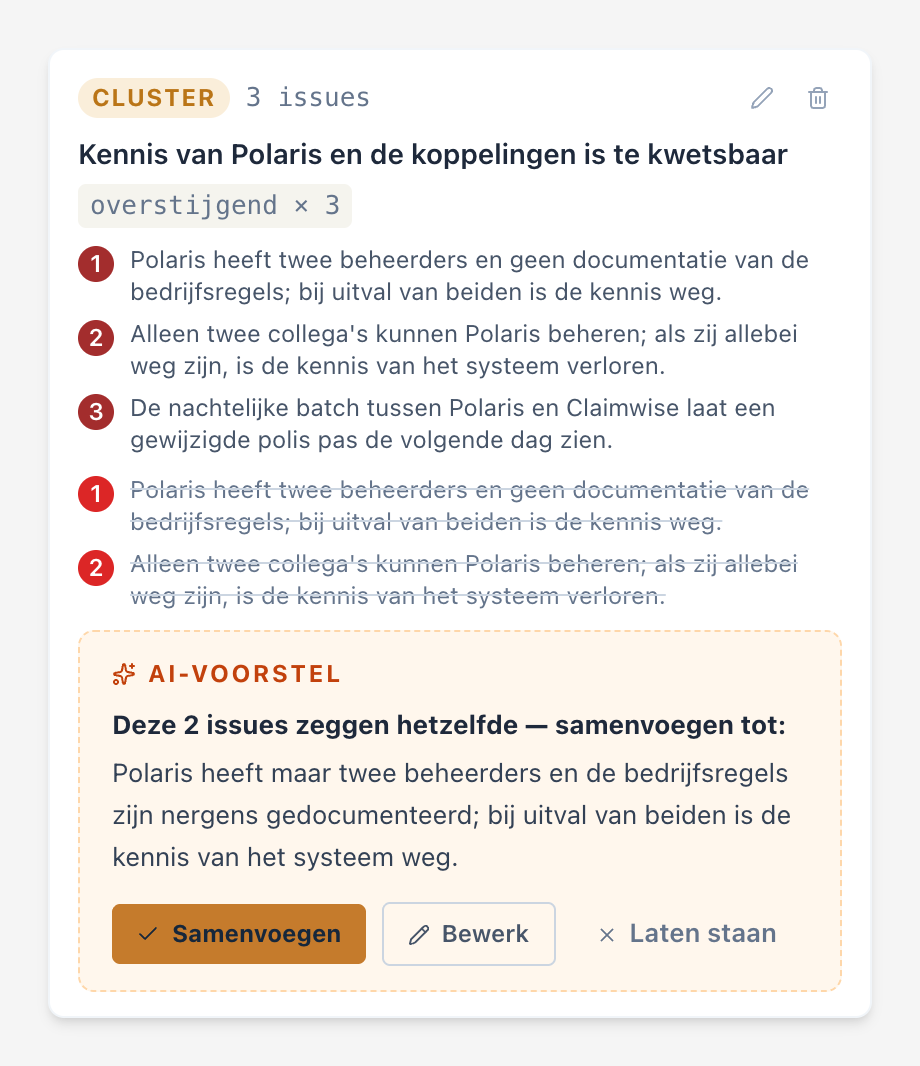
Every proposal is shown as a proposal, with where it comes from (your documents or general knowledge), and becomes content only when someone on your team accepts it. Nothing reaches a client or a board unread. Every AI button shows a counter and the usual duration while it works. On the issues in a cluster, the AI also proposes merging duplicates; the originals are kept in an archive.
Your own documents are the evidence.
The dossier sits under the worksheets and has two tabs. Incoming holds what you upload; the AI searches it and shows where each proposal comes from. Outgoing holds every downloaded version of a report, with version number, date and author, never changed afterwards.
What is on the worksheet, written out.
Every worksheet has a report that is created when you open it. An AI report writes its chapters straight away, with a progress line, and you update it with one button. You download it as a PDF in the layout of the screen. Next to that comes a one-pager: one A4 per worksheet and one for the whole canvas, written as a business text without counts. On top of that, a management summary.
Reports serve the consultant. What goes to a client has been read by the consultant first.

Dutch and English, per canvas.
The language is set per canvas; a new canvas takes the language of the organisation. Screens, error messages, reports, e-mails, dates and amounts follow it, and the AI writes in the language of the canvas, even when the dossier is in another language. Existing canvases are not translated.
Several organisations, strictly separated.
Each organisation sees only its own canvases and data. There are three roles: user, administrator of the organisation, and platform administrator. Administration covers users, branding, the language of the organisation and AI budgets.
Models can change. The work does not.
The list of models lives in administration, not in the code. Model and thinking depth can be set per AI button, with a fallback to the previous model if one refuses. A test bench lets a new model run alongside the current one on the same assignments before it goes live, and a nightly check watches the models we use. Swapping a model is a process, not a deploy.
Want to see it on your own change?
An hour's conversation, with the workspace open, says more than this page.
info@belita.nl